

Frontend applications grow in complexity as businesses evolve. Components that once handled a single concern gradually accumulate responsibilities, teams coordinate constantly to avoid breaking each other's code, and simple changes require understanding multiple unrelated business domains. These symptoms don't indicate poor coding practices or wrong framework choices, instead they reveal organizational problems in how code is structured.
The root cause isn't the folder structure itself - it's that components and logic get shared across different business domains without boundaries. A UserForm component starts handling both profile updates and order addresses. A useUser hook gets imported by preferences settings and order history. Profile changes break order processing. Order updates corrupt preference displays.
Traditional approaches structure code by technical layers: components in one folder, hooks in another, utilities in a third. This organization doesn't directly cause the problem. You can maintain domain separation within technical folders through subfolders or conventions. But technical organization provides no structural guidance about domain boundaries. When everything lives in /components, importing UserForm into both profile code and order code looks identical. Nothing signals that these represent separate business concerns. The structure makes crossing domain boundaries as easy as respecting them.
Domain-Driven Design - or simply DDD - offers a structured alternative. Instead of organizing code by technical concerns, DDD structures applications around business domains. Each domain represents a specific area of business functionality with clear boundaries, focused models, and clear ownership. This alignment between code structure and business structure eliminates the unintentional coupling that technical organization creates.
This post demonstrates the transformation from tangled architecture to domain-driven organization. The scenario: your product manager asks you to add a toggle so users can disable order confirmation emails. Simple enough - a checkbox in user preferences, two hours of work at most. But you open the codebase and find that this change touches the Profile team's user model, the Orders team's notification system, and the Preferences team's settings interface. Those two hours become two days of coordination and merge conflicts.
You'll see how the current UserDashboard component creates this complexity, understand the DDD concepts that establish clean boundaries, and follow the complete refactoring that turns that two-day nightmare back into a two-hour task. The notification toggle runs through every example - each pattern and code snippet directly addresses making this simple change actually simple.
The Problem: When Frontend Architecture Goes Wrong
The problems with technical layer organization become clear when you examine the notification toggle request. You open the codebase and find a UserDashboard component that initially looks well-structured — a standard React component with clear sections for profile information, order history, and user preferences.
Look closer at the underlying data model and the issue surfaces. The User type combines three distinct business concerns into a single structure:
  type User = {
  // Profile domain - managed by the Profile team
  id: string;
  name: string;
  email: string;

  // Orders domain - managed by the Orders team
  orders?: Order[];
  addresses?: Address[];

  // Preferences domain - managed by the Preferences team
  theme: 'light' | 'dark' | 'system';
  notificationSettings: NotificationPreferences;
}
Profile information, order history, and user preferences all share the same data structure. Three separate teams maintain code that touches this single type. The component implementation reflects this shared responsibility:
export const UserDashboard: FC<{userId: string}> = ({userId}) => {
  // The user state spans multiple domain boundaries
  const [user, setUser] = useState<User | null>(null);

  const handleOrderCancel = (orderId: string) => {
    // Must update entire user object just to change orders
    setUser(prev => prev ? {...prev, orders: updatedOrders} : null);
  }

  const handleNotificationToggle = (enabled: boolean) => {
    // Must update entire user object just to change preferences
    setUser(prev => prev ? {
      ...prev,
      notificationSettings: {...prev.notificationSettings, orderConfirmations: enabled}
    } : null);
  }

  return (
    <>
      <ProfileSection user={user} /> {/* Profile team */}
      <OrdersSection orders={user.orders} onCancel={handleOrderCancel} /> {/* Orders team */}
      <PreferencesSection
        theme={user.theme}
        onNotificationToggle={handleNotificationToggle}
      /> {/* Preferences team */}
    </>
  );
}
Notice that single user state object at the top. This state holds everything: profile data, order information, and preference settings all in one place. Each team has separate update methods - handleOrderCancel for Orders, handleNotificationToggle for Preferences. The spread operator ensures that updating orders doesn't erase preferences, and vice versa. Technically, each team can work independently.
The problem isn't the update methods themselves - it's the shared User type that all three teams depend on. When Orders wants to add a field to track delivery preferences, they modify this type. TypeScript ensures this doesn't break Preferences or Profile code at compile time, but all three teams still share ownership of this central definition. Every change requires cross-team awareness because understanding this type means understanding what all three domains need from it.
This becomes concrete when you implement the feature. You need to add orderConfirmations: boolean to the NotificationPreferences type, which is part of the User type. This change lives in the Preferences domain, but you must verify it doesn't conflict with how Orders accesses notification settings or how Profile uses the user model. The type system prevents direct breakage, but it can't eliminate the coordination overhead.
These problems violate the Single Responsibility Principle. The User type has three reasons to change: when profile requirements evolve, when order processing needs shift, and when preference settings expand. The UserDashboard component mirrors this - it must understand all three domains to function. Your notification toggle surfaces the issue immediately: you can't add a preferences setting without understanding the structure that orders and profile also depend on.
The first problem is boundary confusion. Both Orders and Preferences need notificationSettings. Orders reads these settings to determine whether to send confirmation emails. Preferences displays them as UI controls. Who owns this field? Should the notification toggle implementation coordinate with Orders first, or can Preferences just add it? The shared User type provides no answer - both teams have equal claim to the data.
Development slowdown follows directly. The feature requires touching the shared User type, understanding how Orders uses notification settings, and ensuring your change doesn't conflict with Profile's user model usage. TypeScript validates the types, but it doesn't answer the business questions: What should happen to pending order confirmations when the user disables the toggle? Should already-sent confirmations respect the new setting? These are Orders domain questions, but you must answer them to complete a Preferences feature.
The shared structure forces cognitive overload on developers. Preferences hires someone to implement the feature. That developer opens the codebase and finds the User type with fields from three different domains. They must understand why orders and addresses exist in this type, even though they're working on preferences. They must trace through how Orders and Profile use the user state to verify their change won't cause issues. They must coordinate with Orders about notification behavior. A simple checkbox requires domain knowledge spanning three different teams.
The coupling becomes visible during deployments. Preferences finishes the notification toggle and wants to deploy. They've only changed preference-related code, but they modified the shared User type. Orders is mid-sprint on delivery tracking features that also modify this type. Both teams must coordinate their deployments to avoid conflicts in the type definition. Profile, which isn't even involved in this feature, must be informed because they also depend on this type. What should be an independent Preferences deployment becomes a cross-team coordination effort.
These problems share a common root: forcing separate business concerns to share the same type definitions and state structures. The shared User type creates tight coupling between profile management, order processing, and preference settings - three areas of functionality that serve completely different business purposes. Your notification toggle is primarily a Preferences feature that affects Orders behavior. The two domains need a clear integration point - Preferences stores the setting, Orders reads it when sending emails. Instead, the shared data structure tangles them together, forcing you to understand Profile's user model, Orders' notification logic, and Preferences' settings structure all at once. Domain-Driven Design addresses this by establishing clean boundaries between domains and providing clear patterns for cross-domain communication.
Domain-Driven Design: A Solution Framework
Domain-Driven Design provides a clear approach to solving the problems we identified with the notification toggle. Instead of organizing code by technical layers, DDD structures applications around business domains — the specific areas of business functionality that your application supports. This alignment transforms how teams work by creating clear boundaries between different business concerns.
Four core concepts form the foundation of DDD. Understanding them in the context of the notification toggle problem makes their value clear.
A domain represents a specific area of business functionality. In our example, we have three distinct domains: Profile handles user identity and personal information, Orders manages purchases and shipping, and Preferences controls user settings. Each domain has its own business purpose and rules that operate independently from the others.
A Bounded Context creates clear boundaries where a specific domain model applies. Inside the Profile Bounded Context, we only care about profile-related data and logic. The Orders Bounded Context focuses exclusively on purchase-related functionality. This separation means each context can evolve independently. When Profile adds new fields or changes validation rules, those changes remain contained within their bounded context. The Preferences team implementing the notification toggle works entirely within the Preferences Bounded Context.
The Domain Model is the actual code representation of concepts within each domain. Instead of one monolithic User model that tries to serve all three teams, we create domain-specific models: ProfileUser for the Profile domain, Customer for the Orders domain, and PreferenceUser for the Preferences domain. Each model contains only the data and behavior relevant to its specific domain. This focused approach eliminates the ownership confusion and coordination overhead that the shared User type created. The notification toggle will belong clearly to Preferences while maintaining a clean integration point with Orders - we'll see exactly how in the implementation section.
Ubiquitous Language ensures that business and technical teams speak the same language within each domain. The code uses exactly the same terms that business people use when discussing their work. When the Profile team talks about "users" with "avatars," the code has a ProfileUser type with an avatarUrl field. When the Orders team discusses "customers" who "place orders," the code has Customer and Order types. When Preferences discusses "user settings" and "notification preferences," the code reflects that language directly. This shared vocabulary eliminates translation errors and makes the codebase immediately understandable to anyone familiar with the business domain.
These concepts work together to solve the notification toggle problem. The bounded contexts provide clear boundaries that eliminate the confusion we saw earlier - instead of one tangled User type, we can identify that Preferences owns the toggle setting while Orders owns the email sending logic. Domain-specific models remove the tight coupling - Preferences manages its own UserPreferences model without touching Profile's ProfileUser or Orders' Customer types. Ubiquitous language reduces cognitive overload - "notification settings" means exactly what the business stakeholders mean when they request the toggle.
Cross-Domain Data and Ownership
A critical question emerges: what about data that multiple domains need, but with different purposes? The notification toggle itself is a good example. Preferences owns the user interface for the toggle. Orders owns the email sending behavior. Both need the notification settings data, but for different reasons.
Consider addresses as another example. The Orders domain needs billing and shipping addresses for order processing. But users typically manage their addresses on a profile or account page. Does this mean addresses belong to Profile? Not necessarily. Address management might belong to Orders because addresses exist primarily for order fulfillment. Profile might only need to display the user's default shipping address without managing it.
The principle is simple: ownership follows primary business purpose, not UI location. Just because a user enters data on the "profile page" doesn't mean that data belongs to the Profile domain. The question to ask is: which team's business logic primarily operates on this data?
For the notification toggle:
-
Preferences owns the setting - The toggle is a user preference, stored as part of
UserPreferences -
Orders reads the setting - When sending emails, Orders checks whether order confirmations are enabled
-
Integration happens through a clear boundary - Orders doesn't import Preferences models directly; instead it uses a well-defined interface
For addresses in our scenario:
-
Orders owns address data - Addresses exist for order fulfillment, delivery tracking, and billing
-
Users manage addresses through the Orders domain interface - Even if this appears on a "My Account" page, it's Orders functionality
-
Profile might display the default address - If Profile needs to show "Ships to: [address]", it gets this through a protective layer from Orders
This creates an important distinction: UI composition doesn't equal domain ownership. Your dashboard page composes ProfileSection, OrdersSection, and PreferencesSection. That's just presentation - bringing together different domain capabilities in one view. Each section remains owned by its respective domain team, maintaining clear boundaries even though they appear together on screen.
The relationship between bounded contexts requires special attention. In our example, Profile serves as an upstream context - it provides user identity information that other contexts need. When someone logs in or updates their name, Profile makes those decisions independently. The Orders and Preferences contexts are downstream — they depend on Profile for basic identity information, but must protect themselves from changes in how Profile represents that data.
This protection comes through Anti-Corruption Layers (ACLs). Profile uses a ProfileUser type with avatar and bio fields, but Orders needs a Customer type focused on purchase behavior. Orders can't simply import Profile's ProfileUser model because that would recreate the coupling we're trying to eliminate. Instead, the ACL acts as a protective barrier that translates Profile's user concept into what Orders actually needs. When Profile changes their data structure, only the ACL needs updating - the rest of the Orders domain remains protected.
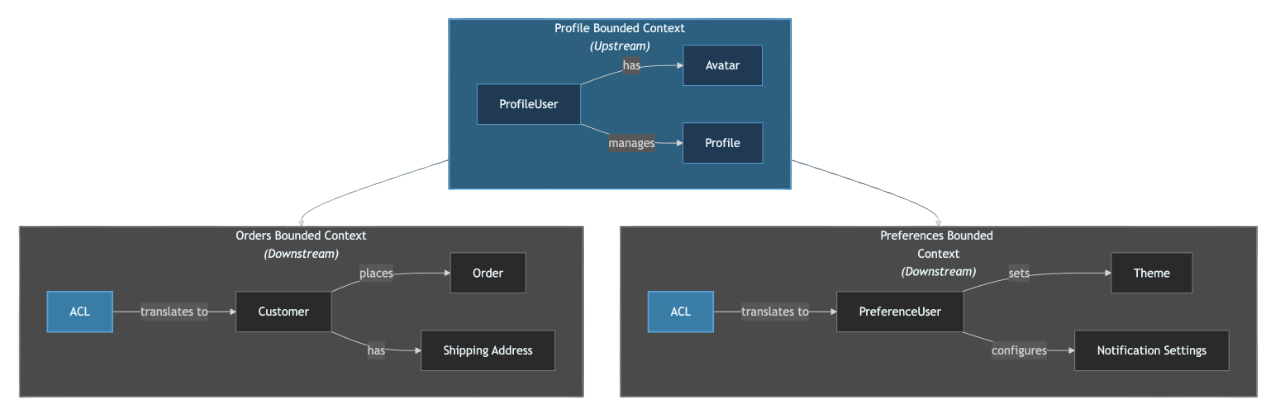
For the notification toggle, this means:
- Preferences implements the toggle in its
UserPreferencesmodel - Orders accesses the setting when sending emails, but through a clear interface
- If either domain needs basic user identity (name, email), they get it from Profile through their ACLs
- Each domain evolves independently - Preferences can add more notification types without coordinating with Orders' internal implementation
Identifying domain boundaries in existing applications becomes easier when you know what to look for. Different stakeholders caring about different features signals a natural boundary - Profile features get requirements from HR teams, Orders from sales, and Preferences from customer support. Different processes indicate separate domains - user registration follows different workflows than order processing or preference management. Different terminology reveals boundaries - when the same concept means different things in different contexts, you've found a domain split. Different change cycles confirm the separation - Preferences might change every sprint while Profile data structure stays stable for months, and Orders deploys twice weekly.
Once you've identified these boundaries, the next question is assigning clear ownership. This principle of ownership following business purpose becomes especially important when refactoring existing applications. You might find address management on your "My Account" page and assume it belongs to Profile. But when you ask "which team's business logic operates on this data?" - the answer is Orders. They handle validation for shipping zones, billing address verification, and address history for delivery tracking. Profile only displays addresses; Orders owns them. The notification toggle works the same way - it appears in a preferences UI, but both Preferences and Orders have legitimate business reasons to interact with that data. The key is establishing clear ownership (Preferences) and a clean integration point (Orders reads through an interface). This clarity eliminates the coordination overhead we saw in the problematic implementation.
With these concepts understood, we can transform the problematic notification toggle implementation into a clean, domain-driven architecture. In the second part of this series, we will follow five concrete steps that apply these principles to real code.